
Post tech jobs. Manage applicants.
Publish your vacancy for free. Accept applications on freehire to review résumés, track hiring stages, and email candidates from one shared workspace.
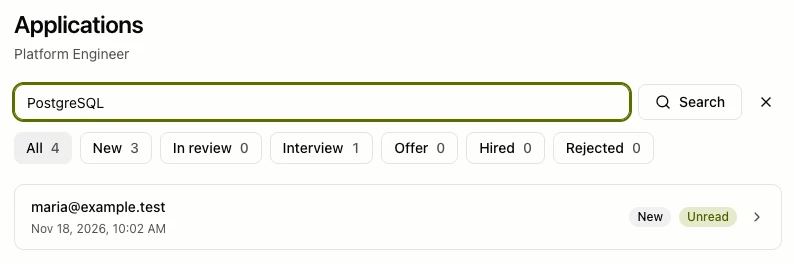
A shared inbox for your hiring team
Choose on-site applications to give your hiring team a single place to review candidates and follow up.
- Review candidates
- Search and filter applications, read screening answers, download submitted résumés, and update hiring stages.
- Work as a team
- Invite recruiters, leave private notes, and see changes in your company’s activity log.
- Keep the conversation together
- Email candidates from the application. Their replies appear in the same thread, with a badge for new responses.
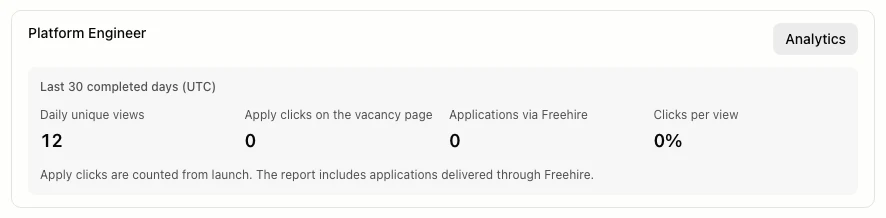
See how each vacancy performs
See daily unique views, clicks on Apply, and applications delivered through freehire over the last 30 completed days. The report also shows clicks per view.
How to get started
Verify your company
Sign in and confirm your work email. Once the company is verified, you can manage its profile and vacancies.
Publish your vacancy
Add the role, location, and skills. Send applicants to your existing ATS or accept applications on freehire.
Review applications as a team
For applications submitted on freehire, open the vacancy inbox and invite recruiters to work with you.
Already have an external job link? Submit it for moderation, or browse the catalogue to see how listed jobs look.
Job promotion pilot
Have an open role that needs more visibility? Tell us about it.
Questions
- What does it cost to post a job?
- Posting a tech vacancy on freehire is free. You can also submit an existing job link for free.
- Do I need a company account?
- To publish and manage your own vacancies, sign in and verify your company using a work email. To submit an existing job link for review, you only need a freehire account.
- Can we keep using our current ATS?
- Yes. When you publish a vacancy, you can direct candidates to your existing ATS or careers page. Choose on-site applications if you want to review applications and email candidates in freehire.
- What happens when I submit an existing job link?
- A moderator checks the submission before it appears in the public catalogue. You can follow the review under “My submissions” in your account.
- Can freehire list our whole careers board?
- If your jobs are on a supported ATS such as Greenhouse, Lever, Ashby, or Workable, freehire can crawl your board and close roles when you take them down.